The iptables Problem
Kube-Proxy and Iptables
As you may know within Kubernetes clusters, kube-proxy pods scheduled on each node is (traditionally) what provides the service to service communication that kubernetes enables via its NodePort and ClusterIP Service Types. At a high level, each kube-proxy pod maintains a watch on the Services and EndpointSlices within your cluster, takes those endpoints, and translates them into 2 sets of iptables rules, Service Chains and Service Endpoint chains.
Without going into too much depth, within the iptables NAT table in the PREROUTING chain, kube-proxy creates a jump rule, which forces all traffic (as seen by the src/dest matching 0.0.0.0/0) to be routed through a dedicated KUBE-SERVICES chain, which holds the set of jump rules for Kubernetes Services
Chain PREROUTING (policy ACCEPT x packets, y bytes)
 pkts    bytes    target                      prot     opt     in     out     source               destination
 xxxx    xxxx      KUBE-SERVICES    all         --        *      *          0.0.0.0/0           0.0.0.0/0            /* kubernetes service portals */
Also in the NAT table, moving to that KUBE-SERVICES chain, we can see there are many KUBE-SVC chains which can be jumped to, depending on the destination. Each of the destinations here for the service chains, are the ClusterIPs created upon the creation of a Kubernete Service object.
Chain KUBE-SERVICES (xx references)
pkts  bytes   target                                                       prot  opt     in     out      source          destination
0       0          KUBE-SVC-2CMXP7HKUVJN7L6M     tcp    --       *       *          0.0.0.0/0      10.100.105.205     /* default/nginx cluster IP */ tcp dpt:80
0       0          KUBE-SVC-TCOU7JCQXEZGVUNU    udp   --       *       *          0.0.0.0/0      10.100.0.10           /* kube-system/kube-dns:dns cluster IP */ udp dpt:53
0       0          KUBE-SVC-NPX46M4PTMTKRN6Y     tcp    --       *       *          0.0.0.0/0       10.100.0.1            /* default/kubernetes:https cluster IP */ tcp dpt:443
0       0          KUBE-NODEPORTS                               all      --       *       *          0.0.0.0/0        0.0.0.0/0              /* kubernetes service nodeports; ... */ ADDRTYPE match dst-type LOCAL
Let’s say from a pod in my cluster, I run a curl command, curl http://nginx.default.svc.cluster.local. After CoreDNS resolves the domain name to the ClusterIP 10.100.105.205, the traffic will travel to the Host NNS and into the iptables NAT table’s PREROUTING chain, to the KUBE-SERVICES chain, matched by the KUBE-SVC-2CMXP7HKUVJN7L6M jump rule since the destination is the ClusterIP. From there, we see below that within the SVC chain, one of the three KUBE-SEP (Service Endpoint) chains will be matched on a random probability, at which point the traffic initially destined for the ClusterIP will be Destination Network Address Translated (DNATd) to the specific pod IP.
Chain KUBE-SVC-2CMXP7HKUVJN7L6M (1 references)
    pkts  bytes   target                                                    prot  opt  in     out     source               destination
    0       0           KUBE-SEP-KUGX7PMQ6AYRRYVC    all      --    *       *        0.0.0.0/0            0.0.0.0/0            /* default/nginx -> 172.31.255.77:80 */ statistic mode random probability 0.33333333349
    0       0           KUBE-SEP-F7B5CTKWOXQJ24MD    all      --    *       *        0.0.0.0/0            0.0.0.0/0            /* default/nginx -> 172.31.255.78:80 */ statistic mode random probability 0.50000000000
    0       0           KUBE-SEP-JHD7AWITLW4UCACG    all       --    *       *        0.0.0.0/0            0.0.0.0/0            /* default/nginx -> 172.31.255.79:80 */

...

Chain KUBE-SEP-KUGX7PMQ6AYRRYVC (1 references)
 pkts   bytes  target                         prot      opt   in     out     source               destination
    0     0         KUBE-MARK-MASQ  all          --     *       *         172.31.255.77        0.0.0.0/0            /* default/nginx */
    0     0         DNAT                          tcp        --     *       *         0.0.0.0/0            0.0.0.0/0            /* default/nginx */ tcp to:172.31.255.77:80
Legacy vs NFT IPtables Backends
Within Amazon Linux 2023 AMIs and Bottlerocket AMIs (k8s v1.33 and later), the iptables backend that the instance will use, and thus kube-proxy will use, is iptables-nft. The nft backend for iptables was created in order to serve as a compatibility layer, allowing users to keep using the well-known syntax for iptables, while transitioning to the superior backend performance of the nftables framework. Under the hood, iptables-nft takes the chains and rules it instructed to create, and translates them to nftables rules. Going into a little bit more detail, iptables-nft and iptables-legacy also differ greatly in the syscalls made from the user-space iptables program to the kernel.
With iptables-legacy, functionality is achieved using the older getsockopt and setsockopt Kernel APIs, where setsockopt (syscall=54) is the primary system call used by iptables-legacy to modify, add, or delete rules (i.e. iptables -A, -I, -X, iptables-restore, etc.), and to commit the ruleset to the kernel. The syscall used to retrieve existing rules, counters, and table structures (i.e. iptables -t nat -L, iptables-save) by iptables-legacy is getsockopt (syscall=55). The largest issue with iptables-legacy was it’s O(n) rule evaluation, meaning the evaluation of individual packets scales linearly with the number of rules within iptables. At a small scale, this isn’t necessarily a problem. However, as the use of iptables grew, it become clear that this growing latency added to the life of packet was not desirable.
Given this and some other factors, the linux community created iptables-nft, which allows continued use of traditional iptables syntax, while improving the safety of concurrency. The legacy interface has no kernel-level mechanism to handle concurrent rule modifications. If two processes attempt to modify the ruleset at the same time, one process can silently overwrite the other’s changes without any warning or error. The userspace lock file (/run/xtables.lock) is a convention and is not enforced by the kernel, so there is no real guarantee of safety.
With the iptables-nft backend, concurrency is handled through Netlink’s transactional model. If two processes conflict, the second one receives a error from the kernel indicating that the ruleset has changed, allowing it to retry the operation rather than silently losing changes. Additionally, rather than using the getsockopt/setsockopt Kernel APIs, iptables-nft communicates with the kernel via Netfilter sockets and the sendmsg/recmsg syscalls. In iptables you see the same format of iptables rules, with an addition that there are nftables tables, chains and rules created. Please see an example below of the KUBE-SERVICES chain within nft.
table ip nat {
    chain KUBE-SERVICES {
        meta l4proto tcp  ip daddr 10.100.105.205  tcp dport 80 counter packets 0 bytes 0 jump KUBE-SVC-2CMXP7HKUVJN7L6M
        meta l4proto udp ip daddr 10.100.0.10  udp dport 53 counter packets 0 bytes 0 jump KUBE-SVC-TCOU7JCQXEZGVUNU
        meta l4proto tcp  ip daddr 10.100.0.1  tcp dport 443 counter packets 0 bytes 0 jump KUBE-SVC-NPX46M4PTMTKRN6Y
        fib daddr type local counter packets 5137 bytes 308220 jump KUBE-NODEPORTS
    }
Everything Breaks at Scale
Scale, is where the “new and improved” nft backend sees its downfall. The benefits of iptables-nft come from it’s improved “saftey”, not speed. In fact, it trades off speed in favor of the concurrency safety provided by interacting with the Netlink APIs. When conducting issue reproductions with a larger numbers of services/endpoints, there was a large increase in the times it takes kube-proxy to sync its rules from the cluster’s EndpointSlices.
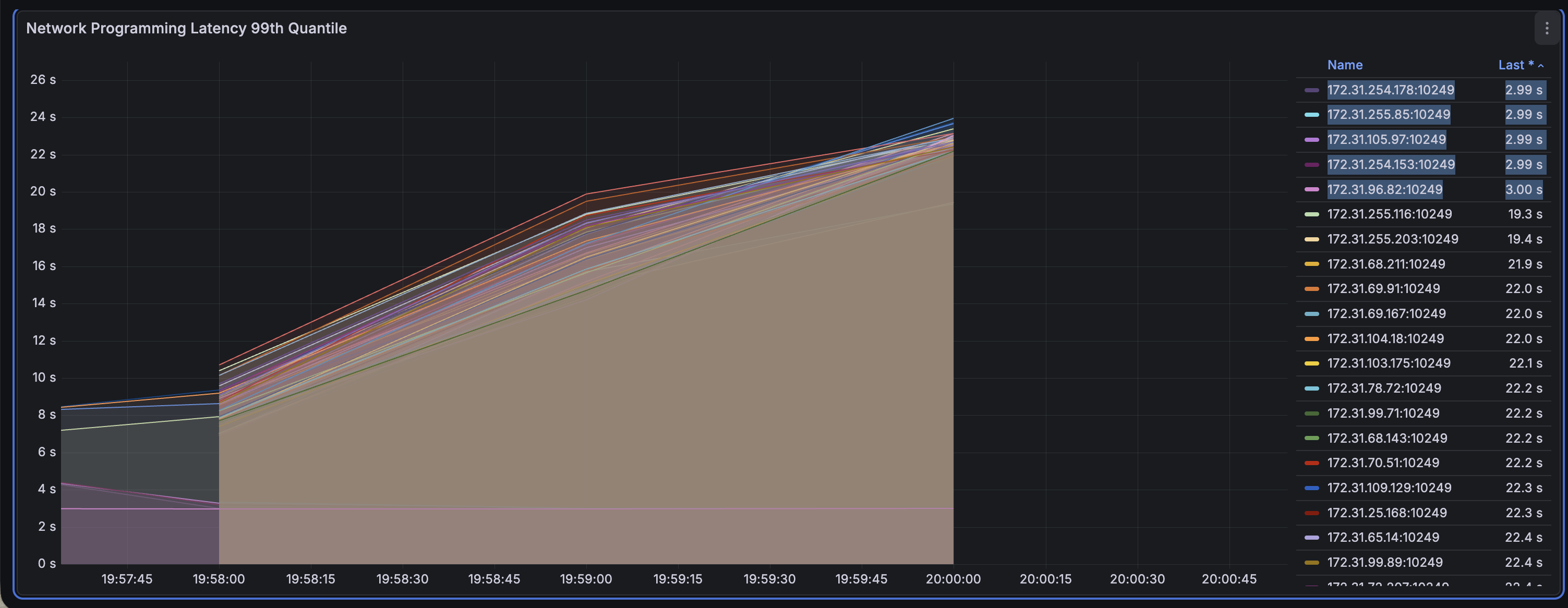
To get some deeper information, I setup a few reproductions with a small set of AL2 (iptables-legacy) nodes and a large set of AL2023 (iptables-nft) nodes. Zooming in to each of the below graphs, we see 5 notably low times for networking programming of iptables rules. These are the nodes running iptables-legacy.
iptables-legacy vs. iptables-nft (4k Pods)
iptables-legacy vs. iptables-nft (11k Pods)
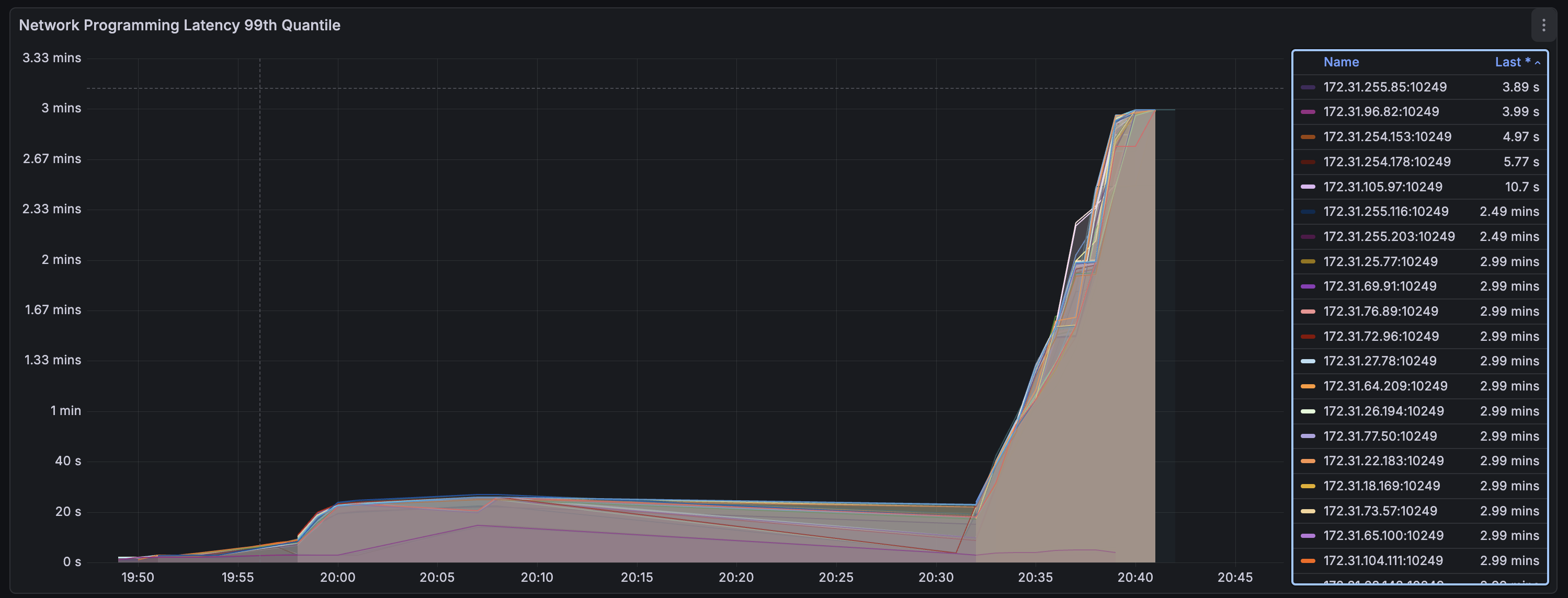
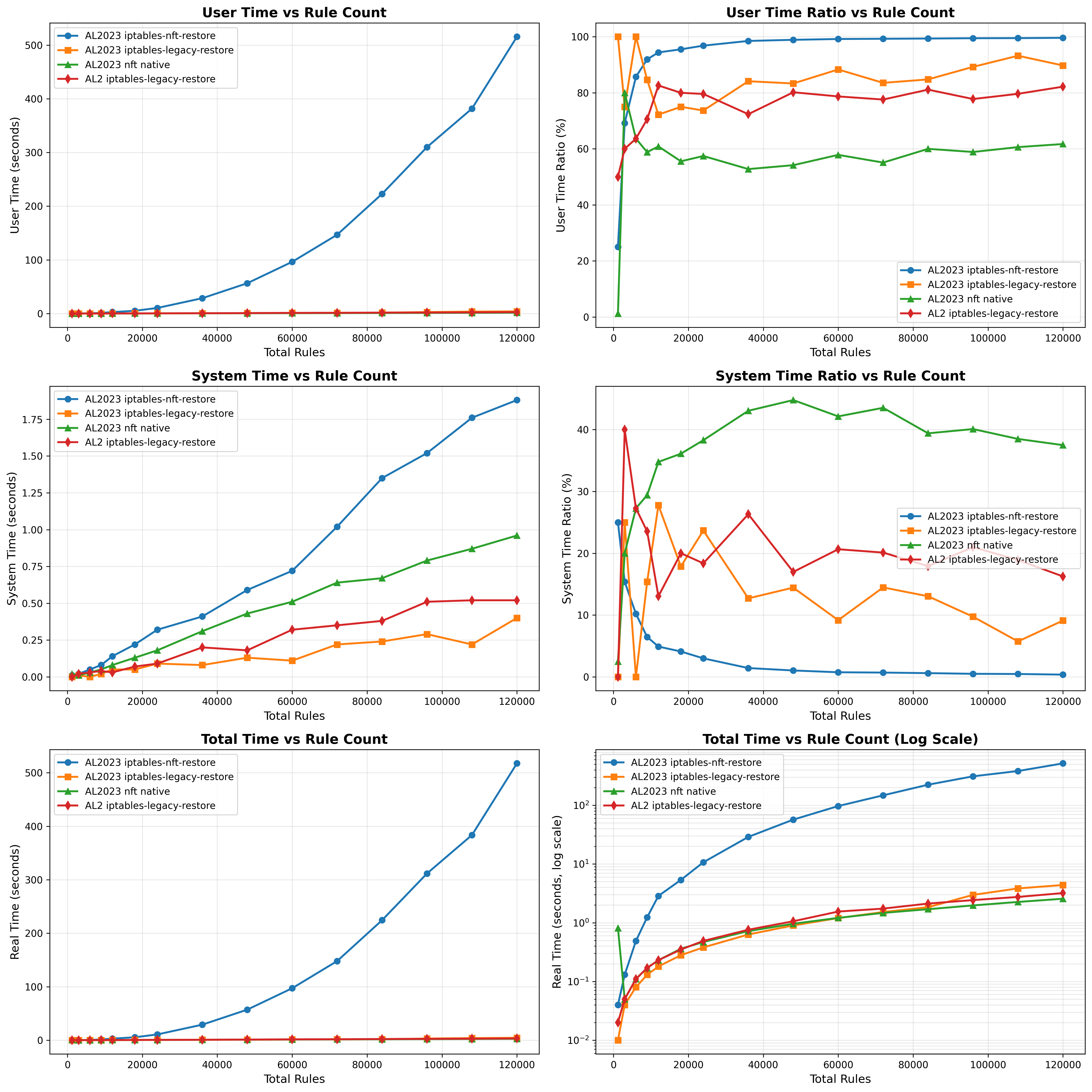
The results of the legacy and nft backends are drastically different at this large scale, and only get worse as scale grows. Working with the Amazon Linux Kernel team (thanks Bjoern!), we were able to get some nice benchmarking comparing the iptables backends against native nft which you can see below. The blue line represent iptables-nft throughout and in the graph on the top right, we can see that as the number of rules scales, the percentage of time in userspace approaches 100%. This suggests that the stalling is in the translation of rules required by iptables-nft.
Additionally, from the Total Time vs. Rule Count graph, we see that the exponential function for iptables-nft grows exponentially and there is a large degradation in performance starting at around 20,000 iptables-nft rules.
Native nftables
-
how do it work?
-
why faster than iptables?
-
why different than iptables-nft?